Fine details of Game Audio
Watch Your Rates -- Digital Audio Theory for Game Development
(using some math and physics!)
By Fauxless (fauxless.net.)
VERY BASIC DIGITAL AUDIO THEORY
In game audio, you are typically utilizing digital audio to store your creations or samples. Traditional audio is just made up of pressure waves that our ears are able to understand and transmit to our brain. Digital audio is a sneaky technique that lets you record those pressure signals using electrical data signals. Digital audio's primary benefit is that it is incredibly flexible for modifying the original signal, while also being accurate to the original recorded signal. In other words, you can store and share recordings easily, while also freely and easily modifying or making new ones entirely on your own computer.Audio goes through 3 phases as it transfers between your brain and the computer. Let's take the example of a microphone for explaining this first step.
A microphone is a transducer, which means that it changes the physical changes it detects into voltage changes. The microphone is essentially converting the energy of the physical wave into an analogue medium. Analogue signals have an infinite number of possible information it can contain, unlike digital audio which doesn't, as a result of computers utilizing 0's and 1's. Computers cannot work with an infinite amount of info.
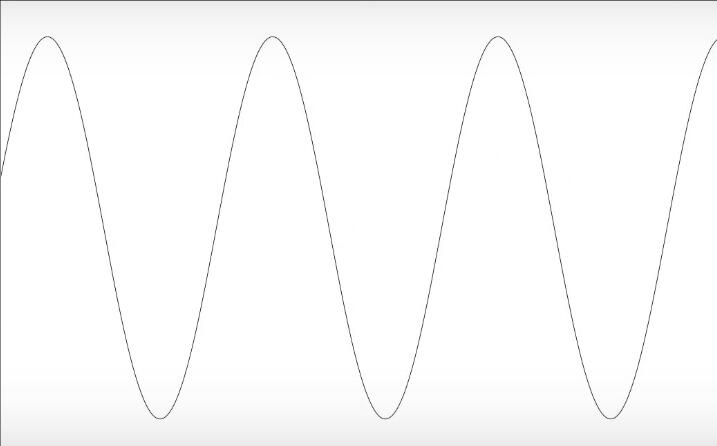
Above is an example of an analogue signal. It has an infinite number of theoretical points, and are synonymous with vinyl recordings. Now, say that a microphone has got a hold of the analogue signal that was originally a pressure wave in the real world. How would you convert this to a point in which the computer can understand it?
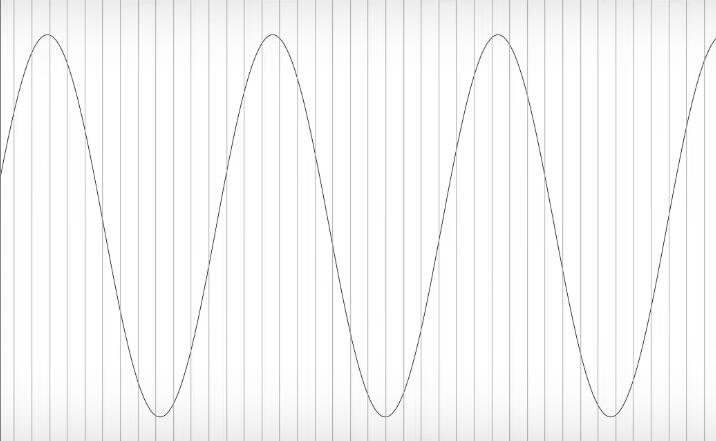
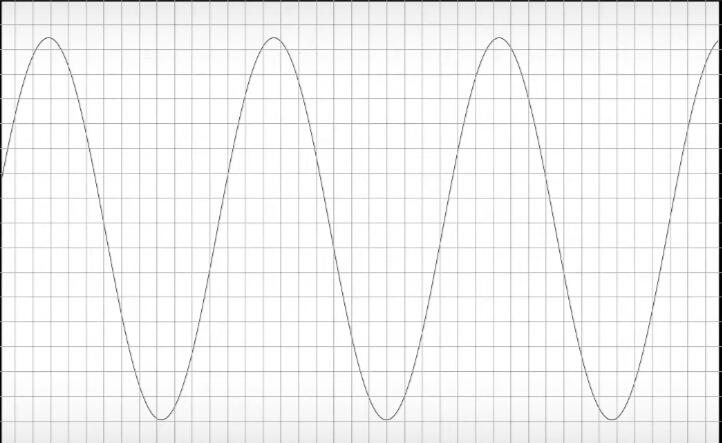
Above is the same analogue recording from before but with sampling applied. What is happening here is that the analogue to digital converter that your microphone or audio device uses to communicate with your computer is taking certain subsections or snapshots of the analogue wave.When this is done, suddenly the audio no longer has an unlimited number of points of information. If digital audio did not have this information limitation, you theoretically could continue to zoom into a waveform and be able to get an exact measurement of what the amplitude or position of that specific point in time is on that wave. If you're from the photo or digital art world, you might see some parallels with the way a camera or photo's resolution works!Below is the same waveform, but converted to digital on both the X and Y-axis. Measuring the X-axis, like the previous image did, allows us to find the time of a specific point in the wave (think of the beginning transient of a kick drum, for example. That would be on the left side of the X-axis.) The Y-axis measures the amplitude of the specific part of the wave. Amplitude tells us information such as how loud the wave is.
Now that we understand what's going on with the waveform, the next question is: how does the computer determine the digital signal's accuracy against the old, analogue signal it converted?
Sample Rates
What you're looking for is something known as a sampling rate. A sampling rate determines the resolution, or accuracy, of the new signal. It's called this because what the computer is doing, in layman's terms, is taking the original analogue signal and dividing it into samples depending on a specific rate. The computer then averages out the information between each sample. The previous waveform images use squares or lines to show where the computer would take a sample of. The waveform below demonstrates the aftermath of this process. The waveform seems blocky, and jumps between each sample in a much less smooth process.
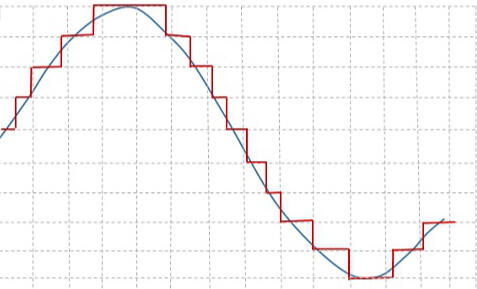
So in effect, the sample rate is what determines just how jumpy we want each sample to be. Having a higher sample rate means that the computer takes a higher total number of samples of the original waveform. As this is more information, a higher sampling rate also means that the computer will be using more processing power and storage to create the new digital signal. This is why hardware that is old (think 1980s video game consoles) all had their games use very simple tones that do not require a high sampling rate. Make sure to have a sample rate of at least twice the highest frequency rate in your signal, to avoid a type of signal distortion known as aliasing. Aliasing is when the sampling rate is set too low so that the samples taken don't match at all what the original signal looked like. Imagine, as an example, a very unusual waveform that had multiple random peaks and troughs; if the sample rate is set so low that the aftermath of the sampling looks nothing or very little like the original, then you've basically created a new sound wave through digital audio conversion. Aliasing is a form of distortion that introduces new frequencies to the signal, and can sometimes appear in game audio if you're doing some things that stretch out or slow down the audio, for example. Modern software and audio hardware does a good job at preventing aliasing, but if you're worried and want more information on how to prevent aliasing, look up something known as the Nyquist Frequency!A CD uses a sample rate of 44,100 Hertz -- meaning 44,100 samples are taken per second. Each sample has a value that determines its position. The number that determines a sample's amplitude is the bit depth, of which CDs use a 16-bit depth. An 8-bit system only gives the computer 8 binary digits (0's and 1's) to determine the specific amplitude of the signal. Some digital audio software use the term "Word Length" to also refer to the same thing as "Bit Depth." While 8 digits might sound like a lot of information to register something like a digital signal's amplitude, it actually is far less in comparison to 16-bit or 24-bit. A digital signal with a bit depth of 8-bits can be represented as 2 to the power of 8, for a total number of 256 available values to the computer. A digital signal with a 16-bit signal is measured as 2 to the power of 16, and has a total number of values equal to 65,536; significantly more information! This is why systems that only use a bit depth of 8-bits can sound more jumpy, digital, and less realistic sounding than one equal to 16 or 24-bits. Audio software might use the much larger 24-bit depth by default, even if you end up exporting audio for a bit depth much smaller than 24. This is because having a higher bit depth provides the person working with the digital audio a high-quality resolution to base their composition or final product on.
Why Does This matter for Games?
Choosing wisely your sampling rate and bit-depth is critical for digital audio because it saves you valuable storage and even some performance headroom. If your audio file only reaches a frequency at a level of, as an example, 1,000 Hertz, then setting a sample rate high might not be necessary. By lowering your sample rate, you can save valuable storage space for your projects while still preventing aliasing.It's important to note that computer hardware has reached the point that rendering and playing back audio at high sampling rates might be negligible on performance. In this case, researching how your middleware or game development software handles playing back audio would help! Especially if you're optimizing your game for specifically older hardware or engines, you might save yourself a lot of headaches by keeping this in mind. If you look around the internet for examples of games that had overlooked sample rate performance glitches, you'll find some examples of developers getting a lot of trouble from their fans for an issue that, on the surface, seems like a basic error (even if the "why" might not be obvious at all to the developer.)If you are composing music, however, sticking with a single sample rate would be fine, as storage and potential performance limitations are not as much of a concern.
Written by FAUXLESS
Find me on my portfolio! fauxless.net.